Most cloud drives can read your files on their own servers. OurClone's Encrypted Remote, built on rclone crypt, adds a password-only encryption layer in front of any remote you've connected — Google Drive, Dropbox, S3-compatible storage, WebDAV, and more. Both file contents and file names are encrypted end-to-end on your device, so only you can make sense of what's stored there.
Add a password-only layer to any cloud you already use
An Encrypted Remote (also called an encrypted vault) is a special remote that wraps another connected cloud storage. Once set up, anything you send into the vault is encrypted locally by OurClone before it ever reaches the provider — both file contents and file names — so Google Drive, Dropbox, S3-compatible storage, or any other connected remote only ever sees ciphertext, never your files.
This is useful even on providers that already encrypt data at rest on their end, because with an Encrypted Remote the encryption key never leaves your device.
Where to find it
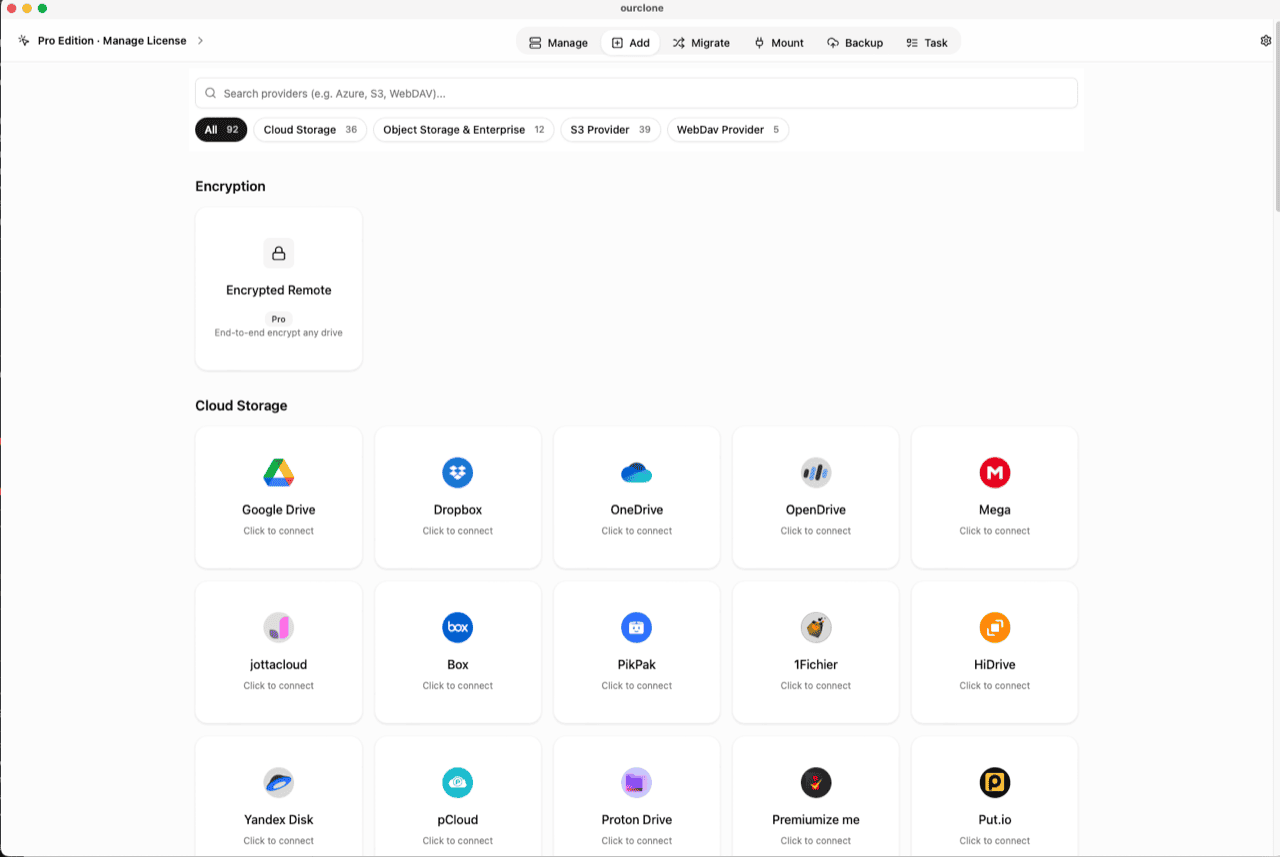
Open the Add page and you'll see a dedicated Encryption category above the regular provider list. The Encrypted Remote card sits there on its own — it isn't tied to any single provider, because it can wrap whichever storage you've already connected.
Create a vault in one dialog
Click the card and the New Encrypted Remote dialog walks you through everything in one screen:
- Name it — e.g.
gdrive-encrypted, so you can tell it apart in file pickers later. - Choose where the encrypted data lives — pick any remote you've already connected as the base storage.
- Pick a folder inside that remote — only this folder will hold the encrypted files; everything else on the drive stays untouched. You can create a new folder right in the picker.
- Set the vault password — this password is the only key. OurClone does not store a recovery copy of it.
- Optional salt password — an advanced second password that strengthens file-name obfuscation. Most people can leave it empty.
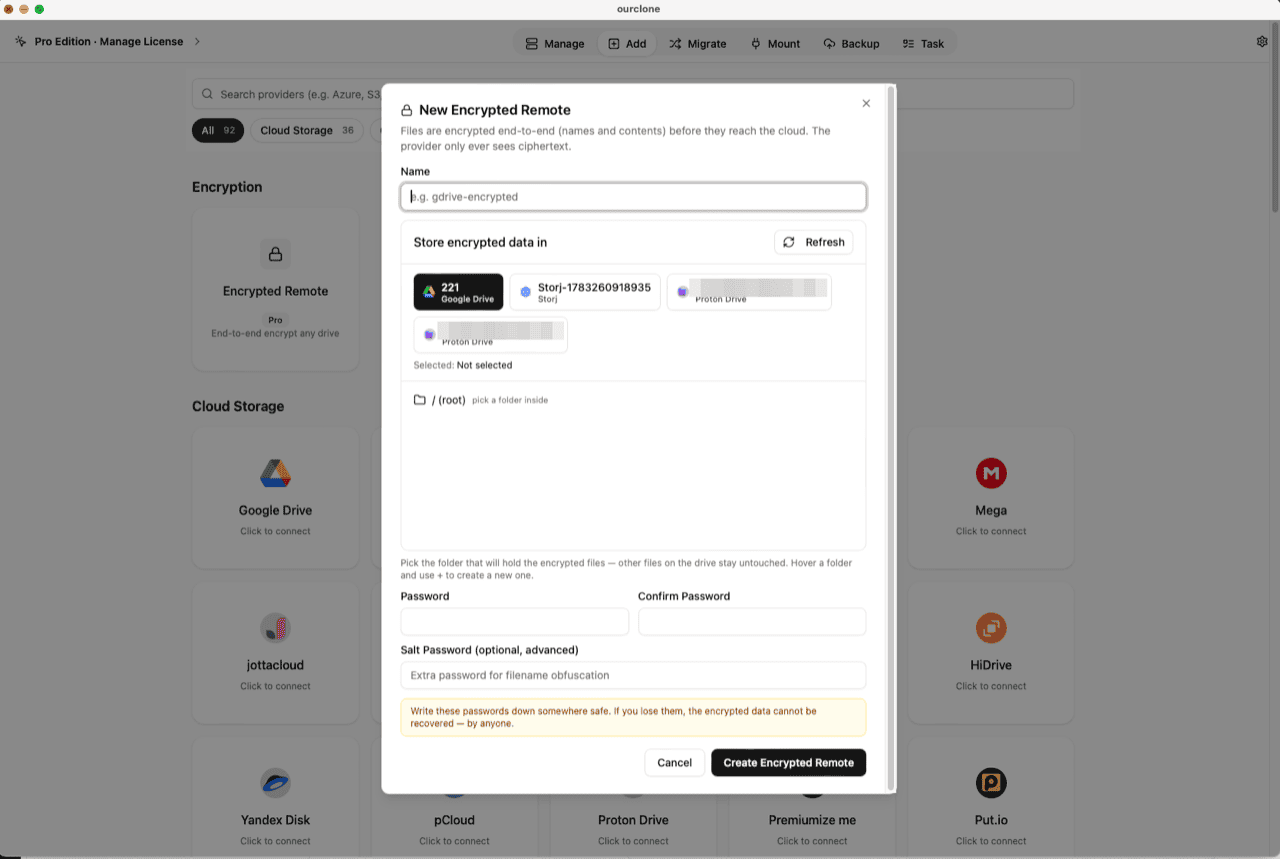
Click Create Encrypted Remote and the vault appears alongside your other remotes, ready to use.
Use it like any normal remote
Once created, the vault behaves like every other connected storage in OurClone — encryption and decryption happen transparently in the background:
- Transfer & sync — copy, move or sync folders into the vault; files are encrypted on the fly as they upload.
- Mount — mount the vault as a local folder and browse your files decrypted in Finder or File Explorer, while the cloud copy stays ciphertext (no extra driver on macOS; Windows needs WinFsp).
- Backup destination — point a restic backup repository at the vault for an extra encryption layer on top of restic's own.
- Browse & manage — open the vault in the Manage page and see your real file names; OurClone decrypts the listing locally.
One thing to keep in mind: if you open the base cloud in the provider's own website or app, you'll see scrambled file names and unreadable contents inside the vault folder. That's the feature working — use OurClone to see the real files.
Your password is the only key
Encryption and decryption both happen on your device. If you lose the vault password (and the salt password, if you set one), the data inside cannot be recovered by OurClone or anyone else — there is no backdoor and no reset. Keep it in a password manager, the same way you would a backup repository password.
Step-by-step guides for your cloud
Each guide covers what that provider can see today, plus the exact setup for a vault on it:
- Personal clouds — Google Drive, Dropbox, OneDrive, pCloud, Box
- Object storage — Amazon S3, Backblaze B2, Cloudflare R2, Wasabi, MinIO
- Servers & LAN — SFTP, FTP, SMB / NAS, WebDAV, Nextcloud
Frequently asked questions
Is the encrypted vault free?
No, it's a Pro feature. See pricing for plan details.
Which cloud providers can I use as the base?
Any remote you can already connect in OurClone — cloud drives, S3-compatible object storage, WebDAV, SFTP, and NAS shares all work as a vault's base storage. See the supported cloud storage list.
Are file names encrypted too?
Yes. Both file names and contents are encrypted before upload. In the provider's own web app the vault folder shows only scrambled names; OurClone decrypts them locally when you browse.
What is the salt password?
An optional second password that adds extra obfuscation to encrypted file names. It's an advanced setting — if you set one, you must keep it as safely as the main password, because both are required to read the vault.
Does it encrypt files already on my drive?
No. The vault only encrypts what you put into it through OurClone. Existing files elsewhere on the drive stay exactly as they are — the vault lives in one folder you choose.
Can I nest one vault inside another?
No. A vault must be built directly on a plain cloud remote, not on top of another vault.
What happens if I forget the password?
The data becomes permanently unreadable. There is no password reset for vault contents — this is what makes the encryption meaningful.
An Encrypted Remote turns any connected cloud into a private, password-protected vault: pick a base remote, choose a folder, set a password, and OurClone encrypts every file name and every byte before it leaves your computer. Lose the password and the data is unrecoverable — that's the trade-off for real protection. This is a Pro feature.
Try this workflow in OurClone
Connect your clouds, run local transfers, mount remote folders, and create encrypted restic backups from one desktop app.
The macOS download is for Apple Silicon (M1 or later). Using an Intel Mac? Download the Intel version