Why Files End Up Leaving iCloud Drive
iCloud Drive tends to fill up on its own, with whatever Apple's apps and your synced folders hand it. Sooner or later something forces a move.
- 📦 The 5 GB runs out — The free iCloud plan is shared with device backups and photos, so a drive full of project folders is usually the first thing to get squeezed. Moving it elsewhere frees the space without paying for iCloud+.
- 🪟 Half your devices aren't Apple — iCloud Drive has apps for iPhone, iPad, and Mac, and a Windows app, but nothing for Android. A work PC or a phone from another brand sees it only through a browser.
- 🤝 Your collaborators live somewhere else — Clients and teammates share through Google Docs, Microsoft 365, or Dropbox links. A folder there is easier to hand over than an iCloud sharing invitation.
- 🔁 You're switching platforms — Leaving the iPhone for Android, or the Mac for a Windows laptop, means the files you kept in iCloud Drive need a new home first.
- 🗃️ One tidy account instead of three — Consolidating scattered folders into the storage you already open every day is simpler than remembering which service holds which project.
What You Need Before You Start
The iCloud side is the fussy one — Apple only lets outside tools in when a few settings line up. Check these first and the rest is routine.
- 🌐 "Access iCloud Data on the Web" switched on — On your iPhone or iPad open Settings → your name → iCloud and turn it on. OurClone's sign-in asks for it, and rclone's documentation says it must be on for accounts that use Advanced Data Protection.
- 🔑 Your normal Apple Account password — rclone's documentation is explicit that app-specific passwords aren't accepted; use the regular Apple Account password plus the two-factor code.
- 📱 A device or phone that can receive the code — Apple sends a 6-digit code to a trusted device, or by text to a trusted phone number.
- 🌏 Not a mainland China Apple Account — OurClone doesn't support Apple Accounts registered in mainland China.
- ⬇️ OurClone v1.4.0 or later — iCloud Drive arrived in that version; the download page always has the current build.
iCloud Drive Next to the Three Usual Destinations
The four services overlap, but they're built around different ecosystems — which usually decides where a folder should go.
| iCloud Drive | Google Drive | OneDrive | Dropbox | |
|---|---|---|---|---|
| Free storage | 5 GB, shared with device backups and Photos | 15 GB, shared with Gmail and Google Photos | 5 GB | 2 GB (Dropbox Basic) |
| Paid plans | iCloud+ from 50 GB up to 12 TB | Google One from 100 GB | Standalone plans, or included with Microsoft 365 | Plus, Essentials, and team plans |
| Apps | iPhone, iPad, Mac, Windows, web — no Android app | Android, iOS, desktop, web | Built into Windows; iOS, Android, Mac, web | Every major desktop and mobile platform |
| Strongest at | Seamless use across Apple devices | Docs, Sheets, and Slides collaboration | Windows and Microsoft 365 workflows | Cross-platform folder sync and sharing |
Method 1: Download from iCloud, Upload to the New Home
The no-software route. It's fine for a handful of folders and gets tedious past that, because every file passes through your own computer twice.
- 📥 Get the files onto your computer — Three ways, depending on what you have:
- On a Mac — open iCloud Drive in Finder. Files showing a cloud icon aren't stored on the Mac yet; right-click them and choose Download Now, or Finder will fetch each one as you copy it.
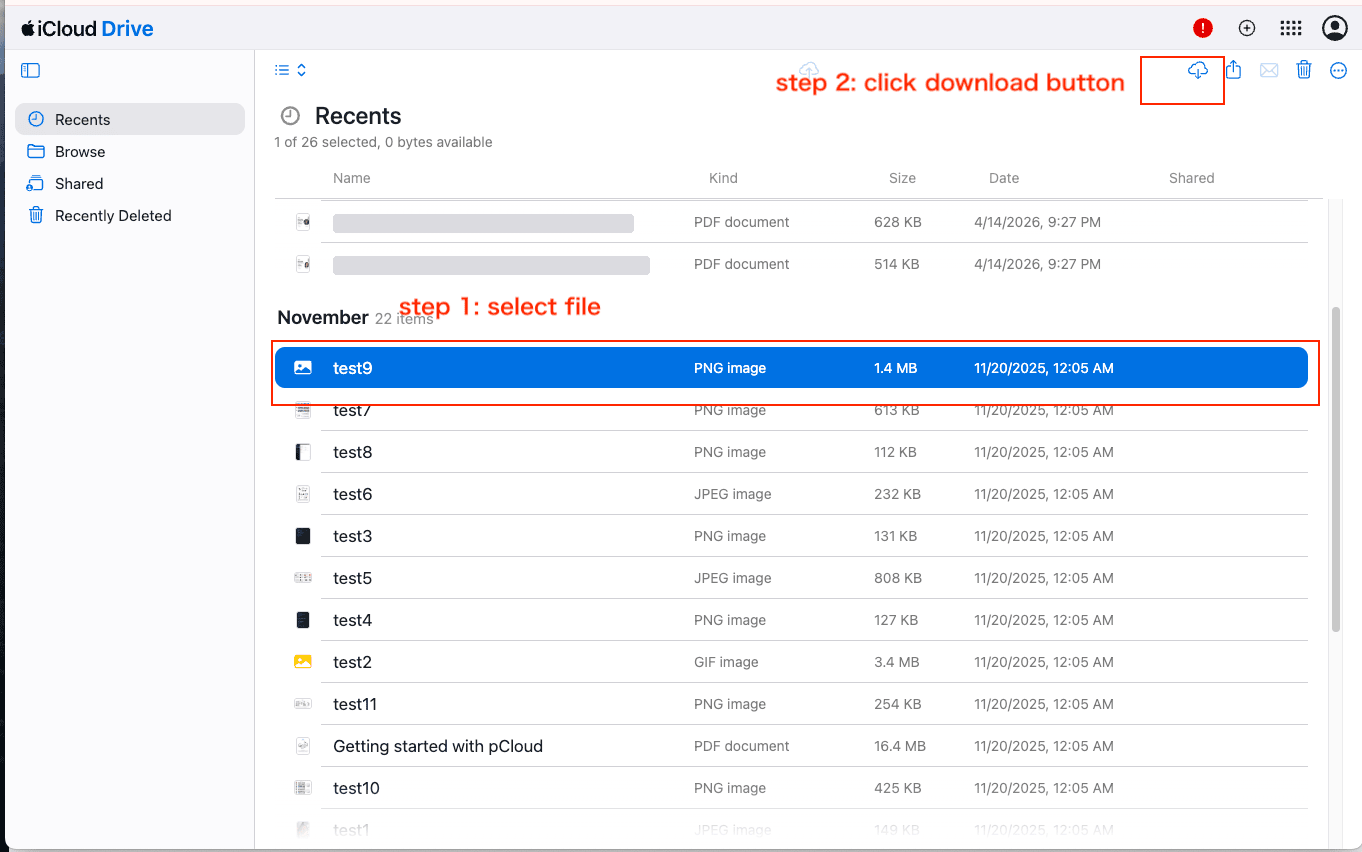
- Any computer with a browser — sign in at icloud.com/iclouddrive, select the files, and click the download button — the cloud with a down arrow in the top-right toolbar. They land in your browser's download folder.
- On Windows — Apple's iCloud for Windows app shows iCloud Drive as a folder in File Explorer.
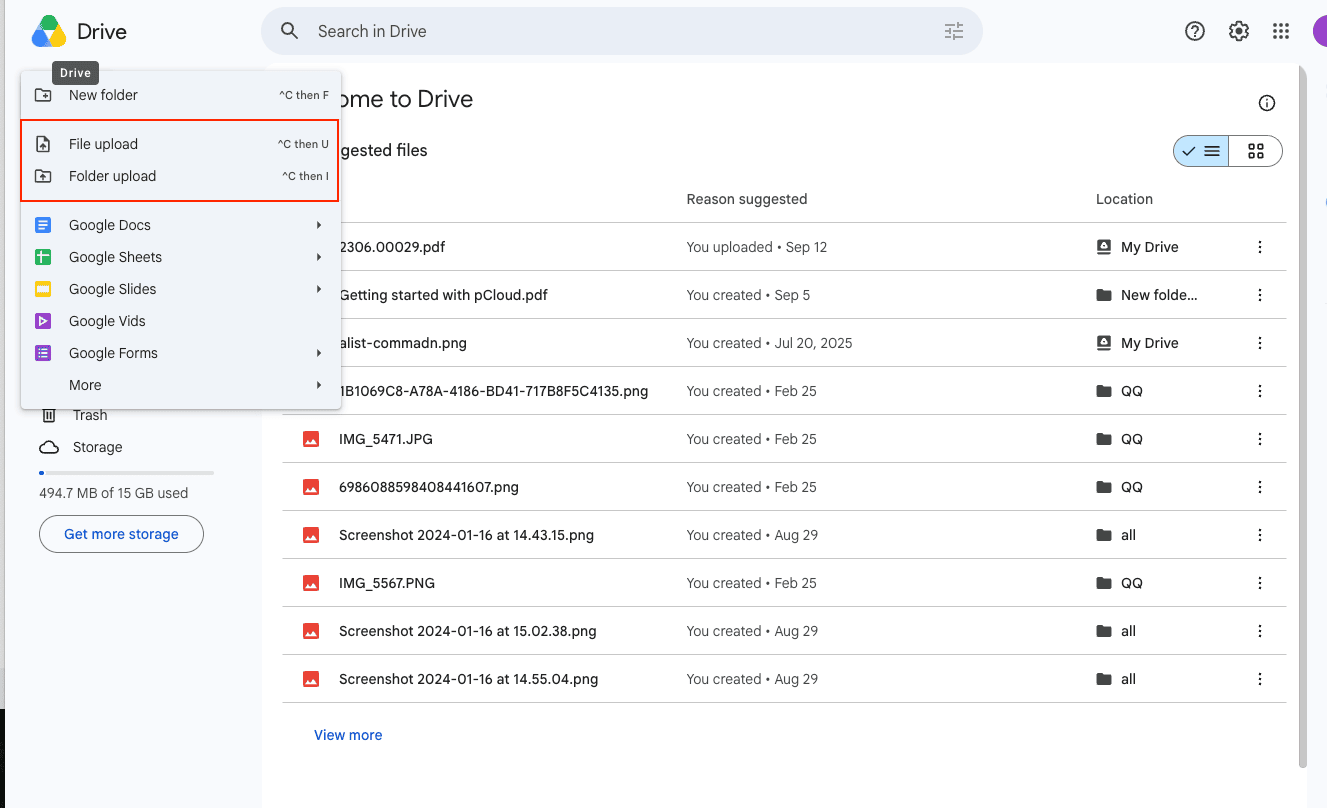
- 📤 Put them into the destination — In Google Drive, click New and choose Folder upload (or File upload), or drag the folder into the browser window; OneDrive and Dropbox offer the same options in their web apps. Faster for big folders: copy it into the synced folder of the Google Drive, OneDrive, or Dropbox desktop app and let that app upload it in the background.
The catch is the double handling. The files are downloaded in full, sit as a second copy on your disk, and are uploaded again — and a browser tab that closes or a laptop that sleeps mid-upload means starting that folder over. For anything beyond a few gigabytes, Method 2 does the same job without the middle copy.
Method 2: Move iCloud Drive Straight to the Other Cloud with OurClone
OurClone signs in to iCloud Drive as a storage, then streams files to the destination from your own computer — no relay server, and no unpacking folders by hand. You add two storages, then run one Migrate job.
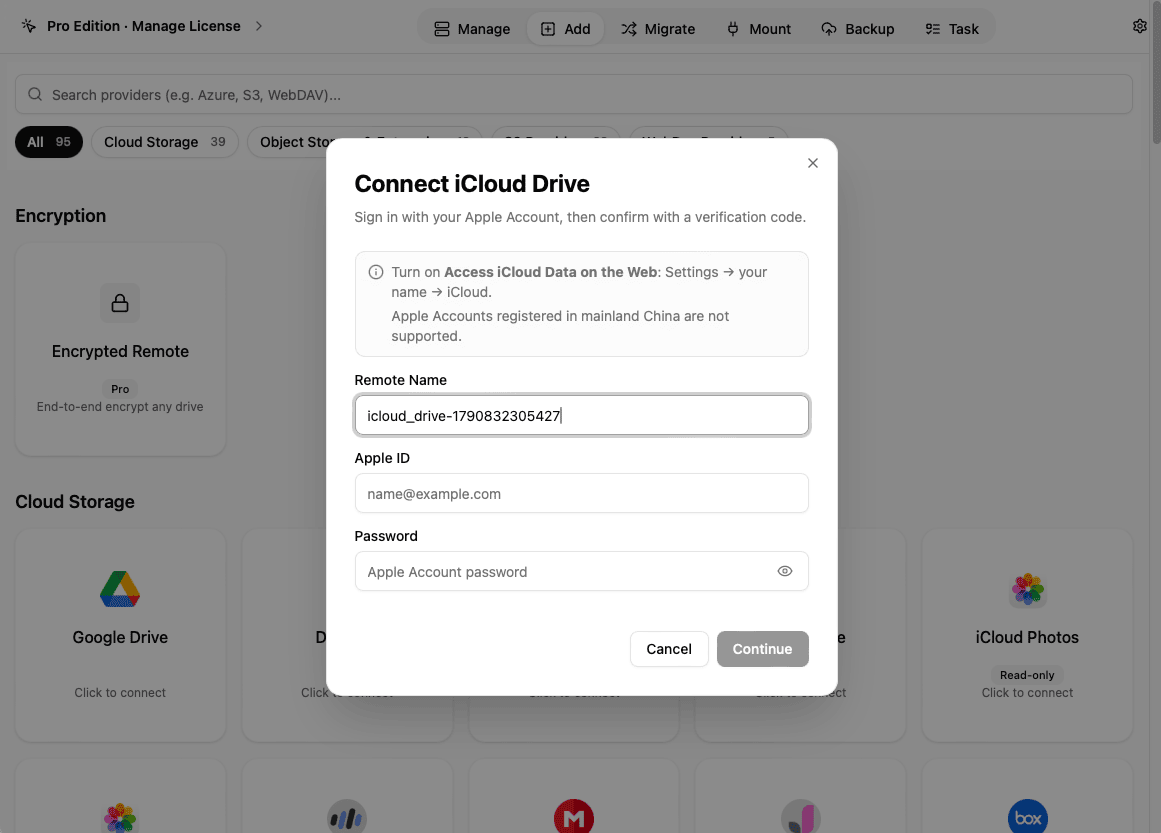
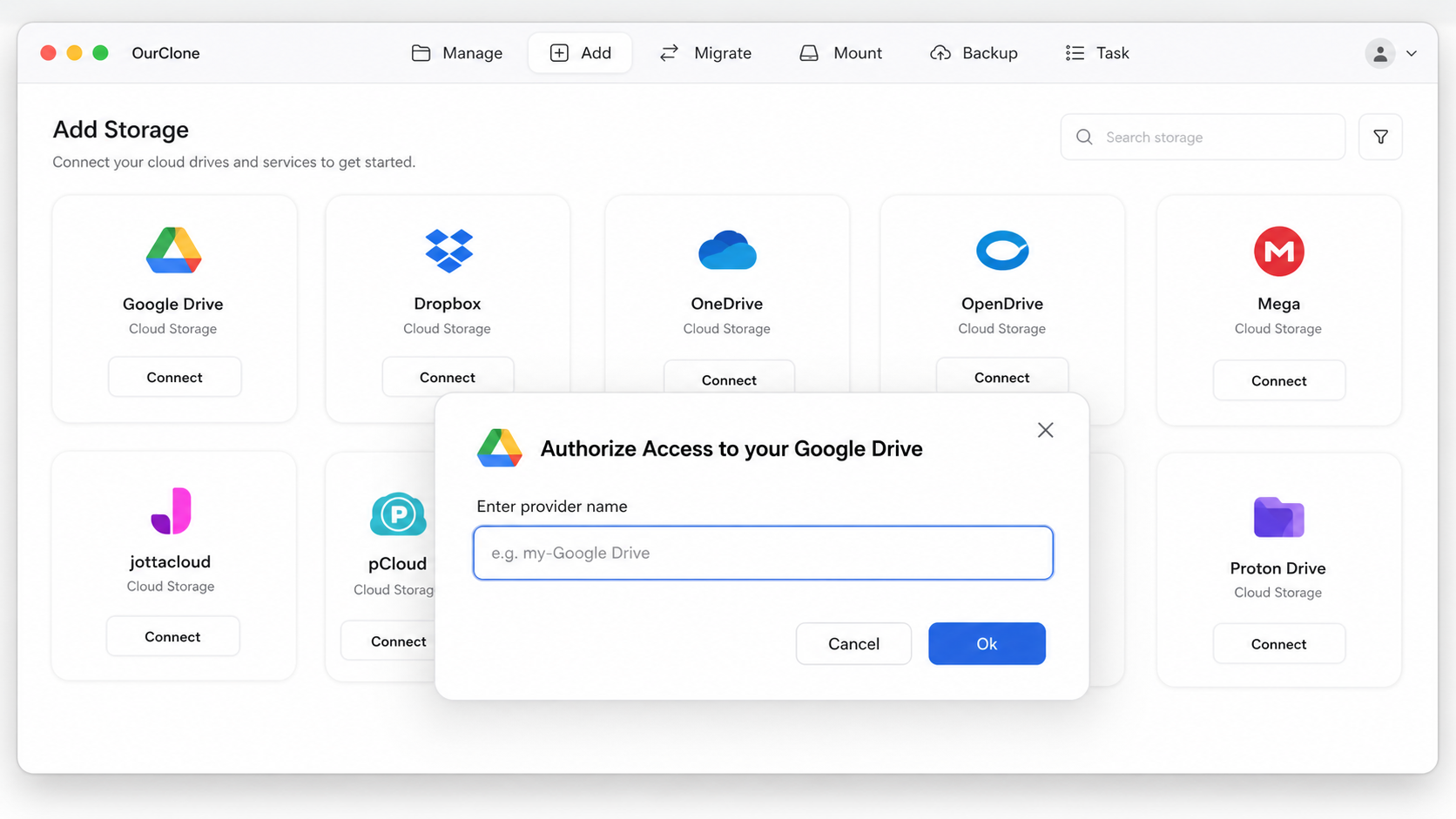
- 🍎 Step 1: Add iCloud Drive as the Source (Apple Account Sign-In) — In OurClone open the
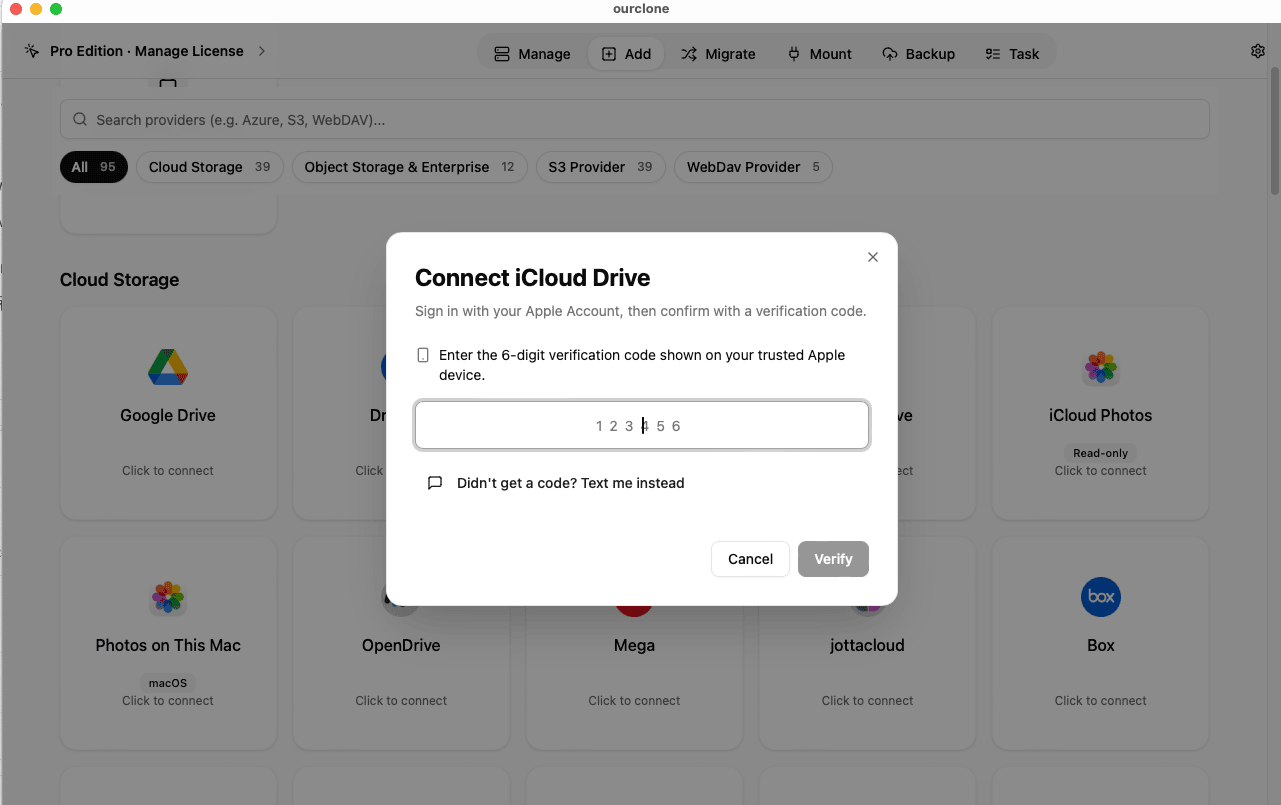
Addtab and pick iCloud Drive. The dialog reminds you to turn on Access iCloud Data on the Web; then enter your Apple ID and password (the Remote Name can stay as it is) and click Continue. Apple asks for a verification code next: type the 6-digit code shown on your trusted device and click Verify, or click Didn't get a code? Text me instead and pick a trusted phone number. If the account uses Advanced Data Protection, Apple may ask you to approve the sign-in on a device too, which can take up to five minutes. Once it finishes, iCloud Drive appears in your storage list. - 🔗 Step 2: Add the Destination (Browser Sign-In) — Back in the
Addtab, choose Google Drive. A browser window opens; sign in and authorize OurClone, and Drive joins the list. OneDrive and Dropbox work the same way — see the OneDrive and Dropbox pages if you're connecting them for the first time. - 🎛️ Step 3: Pick the iCloud Folder, the Destination Folder, and a Mode — Open the
Migratetab. On the source side choose iCloud Drive and browse to the folder you want to move. On the target side choose Google Drive (or OneDrive or Dropbox) and select or create the destination folder. Then choose a mode:- Copy — duplicates the files into the destination and leaves iCloud Drive exactly as it was. Start here.
- Move — transfers, then deletes the originals from iCloud Drive. This is the one that frees iCloud storage, so use it only after you've checked a Copy.
- Sync — makes the destination folder mirror the iCloud folder: extra files that exist only in the destination are removed; iCloud Drive itself is untouched.
- 📈 Watch It Land, Then Spot-Check — The
Taskpanel shows files done, speed, ETA, and anything that failed. When it reads completed, open the destination in OurClone or in its web app and compare a few folders. If you chose Move, confirm iCloud Drive no longer holds those files.
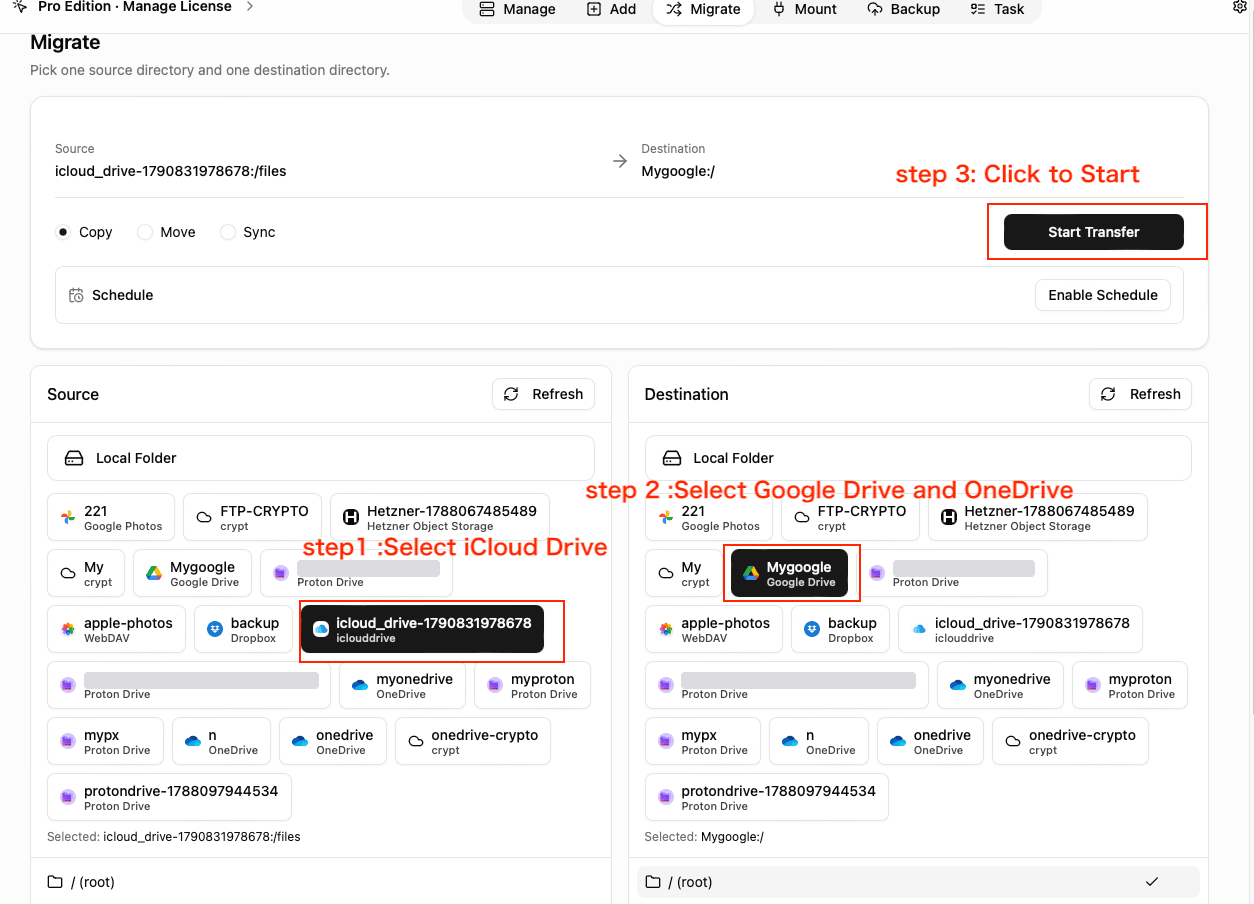
iCloud Drive is the source on the left, Google Drive the destination on the right, with Copy selected. OneDrive and Dropbox are picked the same way.
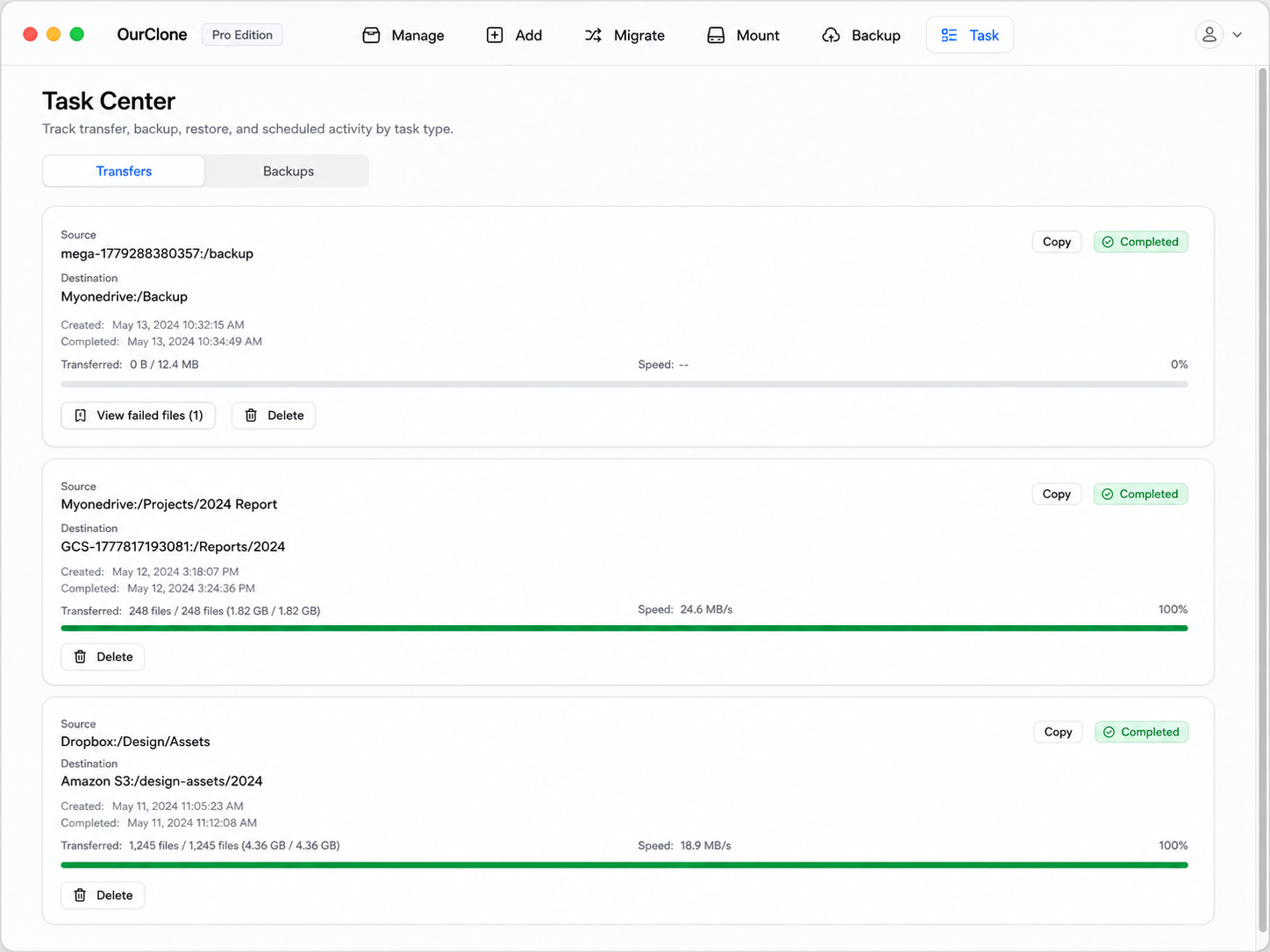
Run a Copy on one small folder first and open it on the destination. Once it looks right, queue the larger ones. The sign-in Apple gives OurClone is a web session, not a permanent key — rclone's documentation puts its lifetime at about 30 days — so if a transfer later fails with an authentication error, add iCloud Drive again from the Add tab to sign in fresh.
Method 3: Transfer iCloud Drive with rclone (Command Line)
OurClone is built on rclone, and rclone has its own iCloud Drive backend. It's the choice for scripts and headless machines — with the catch that you handle Apple's two-factor prompt yourself.
Step 1: Install rclone
Download it from the official page, or run brew install rclone.
Step 2: Configure the iCloud Drive remote
Run rclone config, choose n for a new remote, name it icloud, and pick the iclouddrive backend with the drive service. Enter your Apple ID and password, then answer the verification prompt with the code from your trusted device or by text. Add a second remote for the destination — gdrive for the drive backend, or onedrive or dropbox — and finish its browser sign-in.
Step 3: Run the transfer
The three verbs match OurClone's modes:
# Copy — iCloud Drive untouched, files appear in Google Drive
rclone copy icloud:Documents gdrive:iCloud-Documents --progress

# Move — delete from iCloud Drive after each file arrives
rclone move icloud:Documents gdrive:iCloud-Documents --progress

# Sync — make the Google Drive folder mirror iCloud (deletes extras in Google Drive)
rclone sync icloud:Documents gdrive:iCloud-Documents --progress
Add --dry-run before the first real move or sync, and use rclone lsd icloud: to see the top-level folders you can point at.
Caveats
- ⚠️ The sign-in expires after about 30 days; run
rclone config reconnect icloud:to authenticate again. - ⚠️
moveandsyncdelete files — check the direction before you run them. - ⚠️ If the account uses Advanced Data Protection, Access iCloud Data on the Web must be on, and Apple may ask you to approve the sign-in on a trusted device.
What Trips Up an iCloud Drive Transfer
Most of the trouble happens on Apple's side, before a single file moves.
- 🚪 Sign-in is refused — Check that Access iCloud Data on the Web is on and that you used your regular password, not an app-specific one. OurClone also tells you when Apple blocks the sign-in for account-security reasons, wants you to finish a pending step at appleid.apple.com, or has new iCloud terms waiting at icloud.com — resolve it in the browser, then connect again.
- ⏳ It worked last month and now fails — The web session Apple issues lapses after roughly 30 days. Sign in again as described above.
- 📄 Pages, Numbers, and Keynote files won't open elsewhere — They transfer fine as files, but Google Drive, OneDrive, and Dropbox can't edit them. Export first from the Apple app (in Pages, File → Export To → Word or PDF) if you need to keep working in another suite.
- ☁️ Cloud-only files in the manual route — In Method 1, a file still marked with a cloud icon in Finder has to download before it can be uploaded. Right-click and choose Download Now for the whole folder first.
- 🐌 A big drive takes days — Google Drive accepts roughly 750 GB of uploads per account per day. Uploads stop until the cap resets; run the Copy again afterwards and files already there are skipped.
- 🧮 File counts don't match — Look at the failed-file list in the Task panel. Names OneDrive or Dropbox won't accept, or files that changed while the job ran, are the usual causes.
Quick Answers
Will this delete anything from iCloud Drive?
Only Move does, and only the files that were transferred. Copy never deletes, and Sync only removes extra files in the destination, never in iCloud Drive.
Is this a backup of my iCloud Drive?
It's a second copy in another service, which is useful, but it has no version history and no restore step — a file you delete in one place and then Sync is gone in both. For versioned, encrypted backups of local folders, use OurClone's Backup instead.
Does this move my iCloud photos too?
No — iCloud Drive holds files, while the Photos library is separate. Photos are covered in our guide to getting photos into iCloud Photos.
Do I need a Mac?
Not for the manual route (any browser works) or for rclone. OurClone's iCloud Drive connection signs in to Apple's web service rather than going through Finder, and the app doesn't restrict it to macOS — but the steps in this guide follow the macOS app.