Wasabi and Cloudflare R2 Bill You Differently
On a feature list the two look almost identical — S3 API, buckets, access keys, no egress line on the invoice. The differences only show up in how each one charges and what sits in front of your files.
🟢 Wasabi
Wasabi is "hot" object storage at one flat price, aimed at backups, archives and media libraries that mostly sit still.
- Pay-as-you-go starts at $7.99 per TB per month, with no separate charges for egress or API requests.
- Every account is billed for at least 1 TB of active storage, even if you store less.
- Pay-as-you-go objects have a 90-day minimum storage duration: delete an object after 15 days and you still pay for the other 75 as "deleted storage".
- Free egress comes with a reasonable-use rule — monthly downloads should stay at or below the amount you store.
🟠 Cloudflare R2
Cloudflare R2 is object storage built into Cloudflare's network, priced per gigabyte and designed for data that people and apps actually download.
- Standard storage costs $0.015 per GB-month, and egress is free whether files are read through the S3 API, Workers or an r2.dev URL.
- You pay per operation instead: $4.50 per million writes (Class A) and $0.36 per million reads (Class B).
- Every month includes 10 GB-month of storage, 1 million Class A and 10 million Class B requests for free.
- Buckets can be served on your own domain through Cloudflare's cache, or read directly from Workers.
| Wasabi (pay-as-you-go) | Cloudflare R2 (Standard) | |
|---|---|---|
| Storage price | $7.99 / TB-month | $0.015 / GB-month |
| Minimum bill | 1 TB of storage | None — 10 GB-month free |
| Minimum storage duration | 90 days | None (30 days on Infrequent Access) |
| Egress | Free within reasonable use | Free |
| API requests | Not charged | Charged per million |
Prices from Wasabi and Cloudflare as of November 2026; check both pages before you decide.
When the Move to R2 Makes Sense
Per terabyte stored, Wasabi is the cheaper of the two. People move anyway when the shape of their usage changes.
- 🌐 Your files are downloaded a lot — Product images, video, installers or game assets can easily be read more often than they're stored. That pushes past Wasabi's reasonable-use rule, while R2 egress stays free at any volume.
- 🪶 You store far less than a terabyte — With 200 GB in Wasabi you still pay for 1 TB. The same 200 GB on R2 Standard comes to about $3 a month, before request costs.
- ⚙️ Your site already runs on Cloudflare — Keeping the bucket next to your DNS, cache and Workers means one dashboard and no extra origin to configure.
- 🧹 Lots of short-lived files — Build artifacts or temporary exports deleted within days still cost 90 days on Wasabi. R2 Standard has no minimum duration.
Method 1: Download from Wasabi, Upload Through the R2 Dashboard
Both consoles have a file browser, which is enough for a handful of objects. They're built for browsing, though, not for moving whole buckets.
- 📥 Download from Wasabi — Sign in to the Wasabi console, open the bucket, select the objects and download them to a folder on your Mac.
- 📤 Upload to R2 — In the Cloudflare dashboard, go to R2, create the destination bucket (or open an existing one) and drag the files in.
Everything passes through your disk, nothing resumes if a tab closes, and the R2 dashboard is meant for smaller uploads — large files are better sent through the S3 API, which is what the next two methods use.
Method 2: Transfer Wasabi to Cloudflare R2 with OurClone
OurClone connects to both services with their S3 keys and copies objects from one bucket to the other on your Mac, with live progress. Data flows through your own internet connection — there's no third-party relay — so a wired connection helps for big buckets.
Before you start, create the destination bucket in the R2 dashboard, and give your R2 API token Object Read & Write access to it.
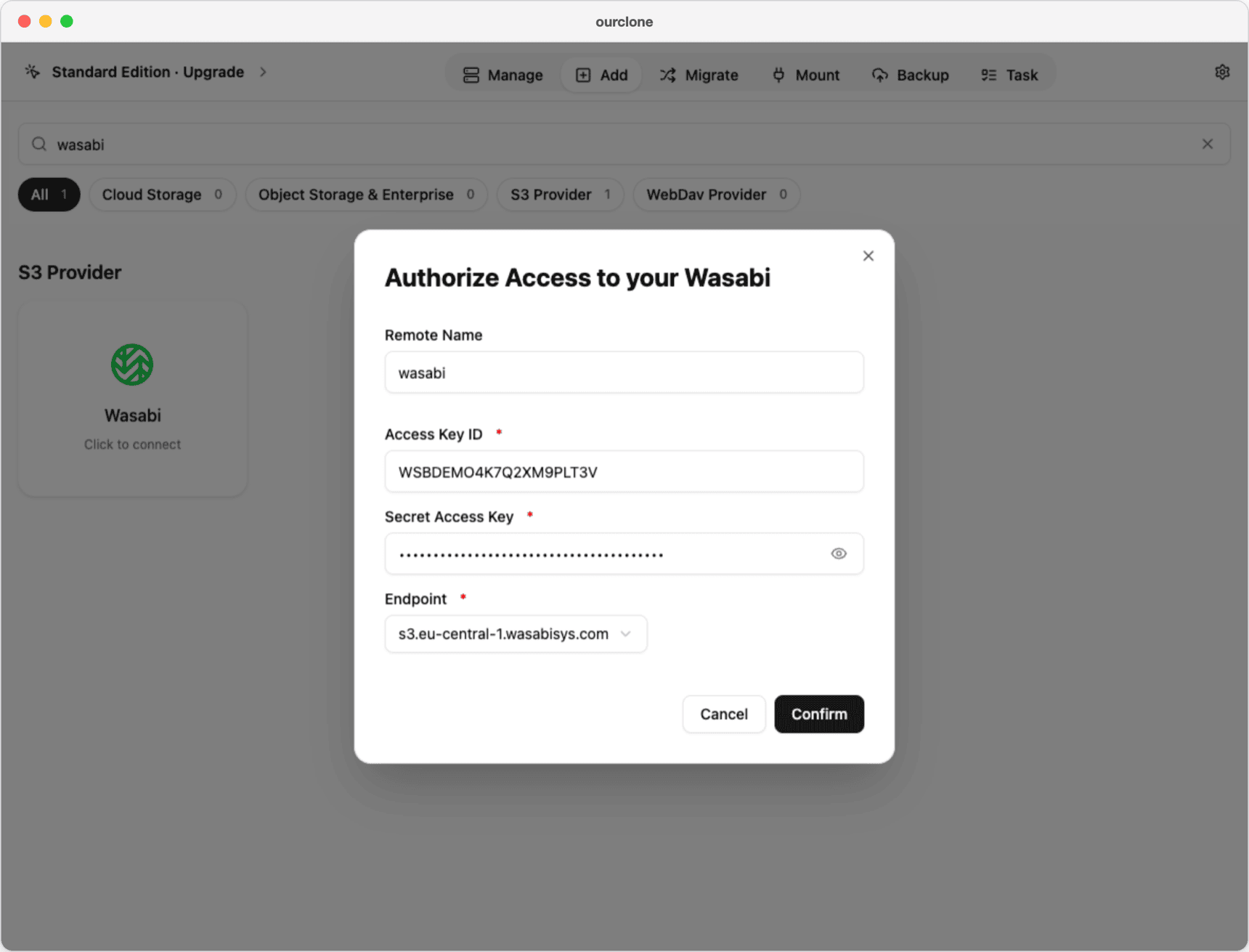
- 🔑 Step 1: Add Wasabi as the Source — In the Wasabi console, open Access Keys and create a new key pair. In OurClone, go to the Add tab, search for wasabi and pick Wasabi. Enter a Remote Name (here
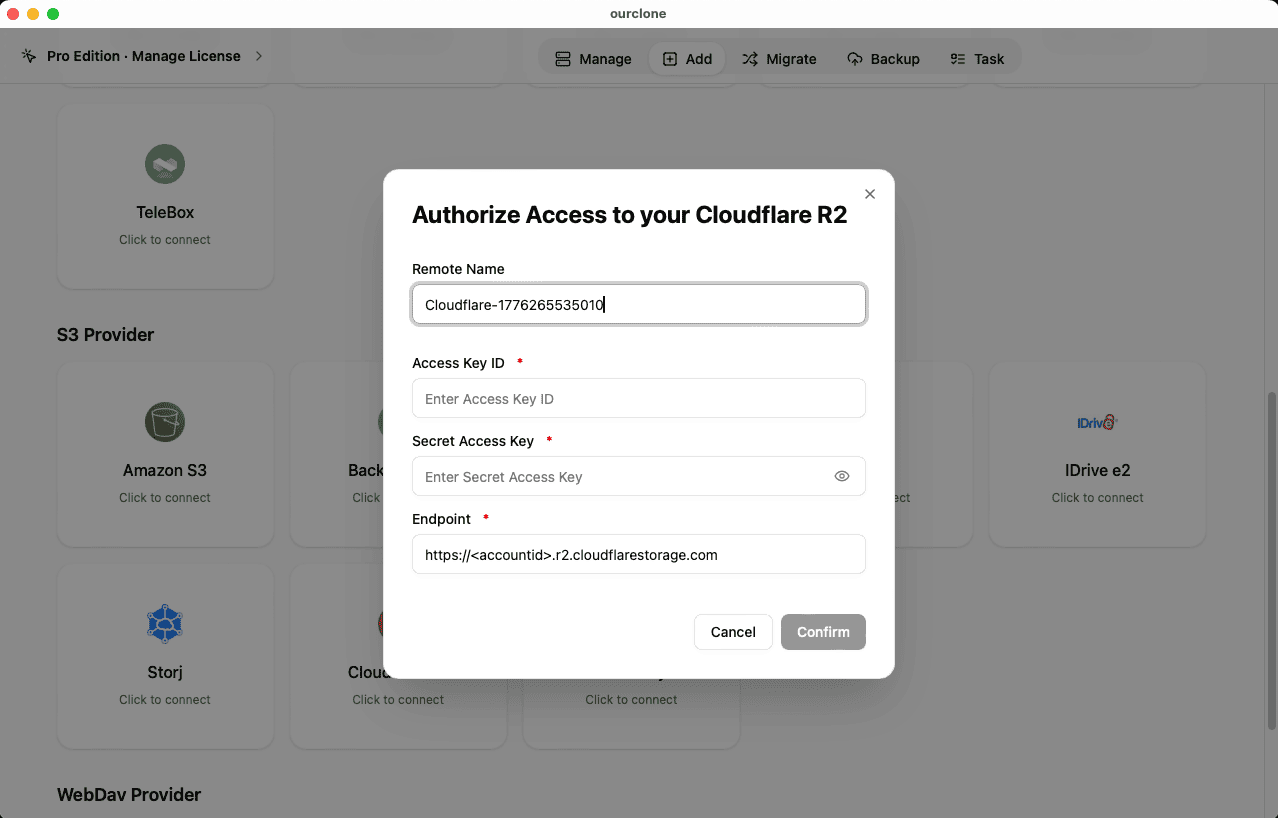
wasabi), the Access Key ID and Secret Access Key, then choose the Endpoint that matches the region your bucket lives in —s3.wasabisys.comis us-east-1, and a bucket in Amsterdam usess3.eu-central-1.wasabisys.com. Click Confirm. - 🔐 Step 2: Add Cloudflare R2 as the Destination — In the Cloudflare dashboard, open R2 → Manage R2 API Tokens and create a token; Cloudflare shows the Access Key ID and Secret Access Key once. Back on OurClone's Add tab, pick Cloudflare R2, enter a Remote Name (here
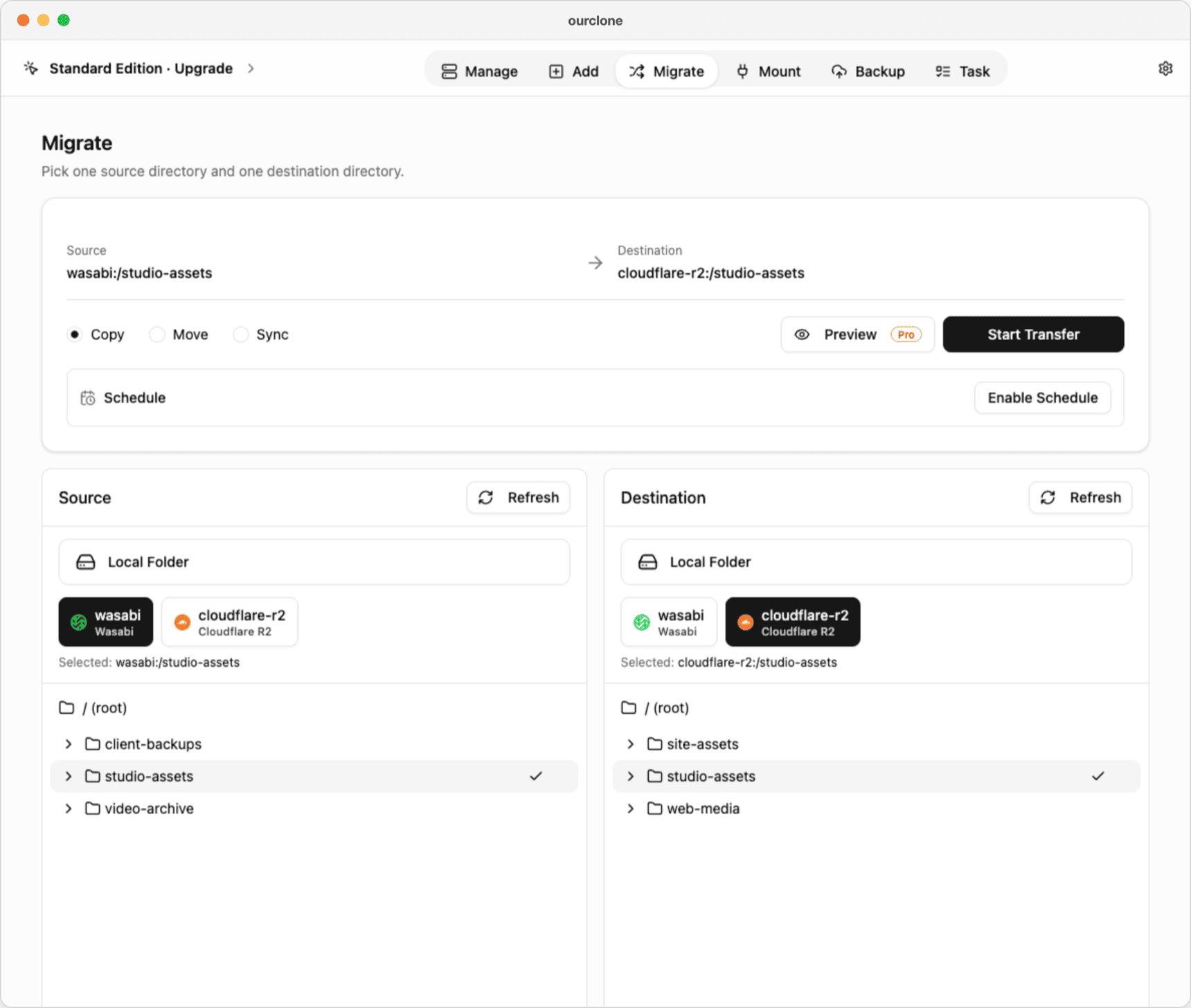
cloudflare-r2) and both keys, and replace<accountid>in the Endpoint with your Account ID:https://<Account ID>.r2.cloudflarestorage.com. Click Confirm. - 🔀 Step 3: Choose the Buckets and a Mode — Open the Migrate tab. In the Source panel, select
wasabiand the bucket or folder to move (herestudio-assets); in the Destination panel, selectcloudflare-r2and the target bucket. Then pick a mode:- Copy — copies the objects to R2; nothing is deleted from Wasabi.
- Move — copies the objects, then deletes them from the Wasabi bucket.
- Sync — makes the R2 bucket match the Wasabi one; objects that exist only in R2 are deleted, Wasabi is never changed.
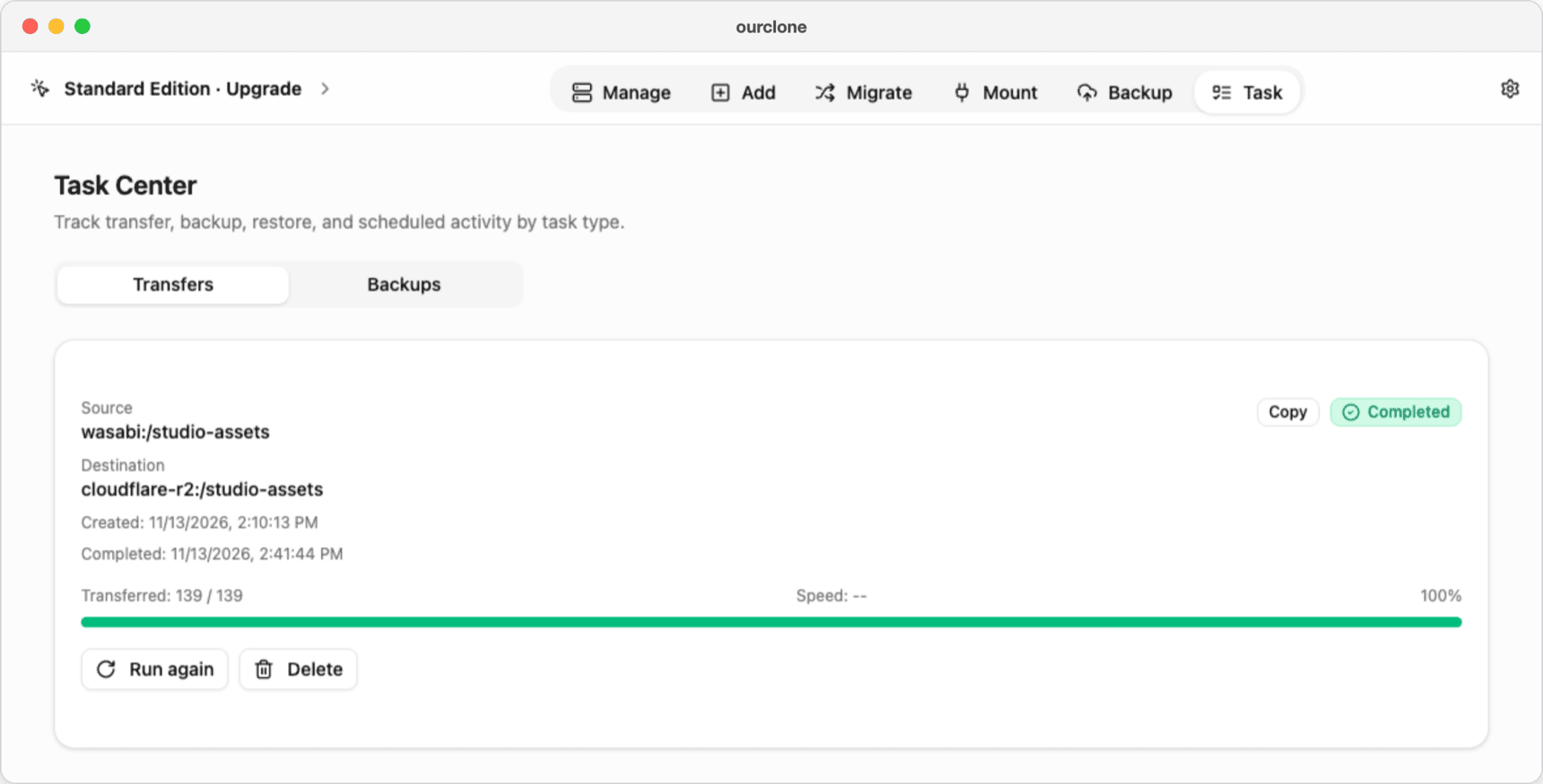
- 📊 Check the Task Center — The Task tab shows how many files have been transferred and the speed, then Completed. If some objects fail, they're listed on the task; Run again retries and skips what's already in R2.
OurClone doesn't test the keys when you click Confirm — a wrong key or endpoint shows up as an error once you open the bucket on the Migrate page. If that happens, delete the connection and add it again with the right values.
Method 3: Transfer Wasabi to Cloudflare R2 with rclone
OurClone runs rclone under the hood, so the same copy works from the Terminal — useful on a server close to both providers, or in a script.
Install rclone
Get it from the rclone downloads page, or run brew install rclone on a Mac.
Set up both remotes
Run rclone config and create two remotes of type s3. The Wasabi remote uses provider Wasabi and your region's endpoint, such as s3.eu-central-1.wasabisys.com. The R2 remote uses provider Cloudflare, region auto and the endpoint https://<Account ID>.r2.cloudflarestorage.com. The rclone S3 docs walk through both.
Run the transfer
# Copy: Wasabi keeps every object
rclone copy wasabi:studio-assets r2:studio-assets --progress

# Move: delete from Wasabi after the copy
rclone move wasabi:studio-assets r2:studio-assets --progress

# Sync: make the R2 bucket match Wasabi (deletes extras in R2)
rclone sync wasabi:studio-assets r2:studio-assets --progress- ⚠️ Run
moveorsyncwith--dry-runfirst to see what would change. - ⚠️ If your R2 token is limited to one bucket, add
--s3-no-check-bucketso rclone doesn't try to create the bucket. - ⚠️ Both sets of keys sit in your rclone config file, and errors only appear in the Terminal.
Before You Delete Anything from Wasabi
- 📅 The 90-day minimum still applies — Moving or deleting objects that are younger than 90 days doesn't stop the bill: Wasabi charges the remaining days as deleted storage. Copy first, and delete the newest data last.
- 💳 The 1 TB minimum stays until you close the account — Emptying a bucket doesn't drop the bill below 1 TB of storage. Close the Wasabi account once R2 is confirmed.
- 📶 Watch the egress rule on repeat runs — Wasabi expects monthly downloads to stay at or below what you store. One full copy is that much; copying everything several times in the same month goes beyond it.
- 🔁 Overwrites count as deletes — Running Sync against a Wasabi bucket that's still being written to replaces objects, and replaced objects fall under the same minimum duration.
- 🌍 "Access denied" or a wrong-region error — Usually the Wasabi endpoint doesn't match the bucket's region, or the R2 Endpoint still contains
<accountid>. Fix the endpoint and add the connection again.
Will Copy or Sync delete my Wasabi data?
No. Only Move deletes from Wasabi. Copy changes nothing there, and Sync only removes extra objects on the R2 side.
Does the transfer go directly from Wasabi to R2?
No — with OurClone or rclone on your Mac, each object is downloaded from Wasabi and uploaded to R2 over your connection. Nothing is stored on your disk, but your bandwidth sets the pace.
Can I keep copying new files across while I switch over?
With Pro, you can save the transfer as a schedule that runs one time, weekly or monthly at a time you pick. Your Mac has to be on when it runs; it isn't continuous sync.
Coming from Amazon S3 or Backblaze B2 instead?
The steps are nearly the same — see Amazon S3 to Cloudflare R2 and Backblaze B2 to Cloudflare R2. To use the bucket like a folder in Finder afterwards, see how to mount Cloudflare R2 on macOS.