Reasons to Take a Bucket Off Amazon S3
Nothing is wrong with S3 itself. The usual trigger is the invoice: data that mostly sits still — project archives, NAS copies, old media — is billed every month by the gigabyte, and getting it back out is billed too.
- 🧾 A flat price per terabyte — IDrive e2 pay-as-you-go is $6 per TB per month. On S3 Standard, a terabyte costs roughly $23 a month in us-east-1, before requests.
- 📤 Downloads stop being a line item — e2 lets you download up to three times your stored volume for free, and doesn't charge for API calls. On S3, every GET request and every gigabyte to the internet past the monthly free allowance is billed.
- 🗓️ No minimum storage duration — Delete an object on e2 the next day and you don't pay for the rest of a 30- or 90-day window, which matters for rotating backups.
- 🧰 Your tools keep working — e2 is S3-compatible, so backup software, rclone and SDKs that talk to S3 can usually point at an e2 endpoint with new keys.
- 🗃️ A second copy somewhere else — Even if production stays on AWS, an e2 bucket is a cheap off-AWS copy of the data you can't afford to lose.
Amazon S3 and IDrive e2, Side by Side
Both store objects in buckets behind access keys, and both answer the same API calls. Where they part ways is pricing and how regions and keys are tied together.
🟧 Amazon S3
Amazon S3 is the original object store and the one most of the ecosystem is built around.
- Storage classes from Standard down to Glacier Deep Archive, with lifecycle rules to move objects between them.
- Billing is per GB-month plus requests, and data transfer to the internet is charged after the first 100 GB each month.
- Access keys are global to your account (or IAM user); each bucket lives in one region, such as
us-west-2. - Deep integration with the rest of AWS — CloudFront, Lambda, Athena, IAM policies.
🟦 IDrive e2
IDrive e2 is S3-compatible hot storage from the company behind IDrive backup, priced for data you keep rather than data you serve.
- $6 per TB per month pay-as-you-go, with a 1 TB minimum charge even if you store less (annual plans are cheaper).
- No API request fees, no minimum storage duration and no charge for deleting objects.
- Free egress up to 3× your active storage; downloads beyond that are $0.01 per GB.
- You enable regions one by one, and every region has its own endpoint and its own access keys — a key created for one region doesn't work in another.
| Amazon S3 (Standard) | IDrive e2 (pay-as-you-go) | |
|---|---|---|
| Storage price | About $0.023 / GB-month (us-east-1, first 50 TB) | $6 / TB-month, 1 TB minimum |
| Requests | Charged per thousand | Not charged |
| Egress to the internet | Charged after 100 GB free per month | Free up to 3× stored data |
| Minimum storage duration | None on Standard (longer on IA and Glacier classes) | None |
| Keys and endpoints | Account-wide keys, one endpoint per AWS region | Keys and endpoint specific to each enabled region |
Prices from AWS and IDrive e2 as of November 2026; check both pages before you decide.
Method 1: Download from the S3 Console, Upload to e2 in the Browser
For a few files this is fine and needs no setup. For a bucket, it isn't: the S3 console downloads objects one at a time, and the e2 web console is meant for occasional uploads.
- 📥 Download from S3 — Sign in to the Amazon S3 console, open the bucket, select an object and choose Download. Folders can't be downloaded as a whole here.
- 📤 Upload to IDrive e2 — Sign in to the IDrive e2 console, create a bucket in the region you want (or open one), and upload the files from your Mac.
Every object lands on your disk first, an interrupted upload starts over, and you're paying AWS egress for the download either way — the next two methods at least do it without the manual clicking.
Method 2: Transfer Amazon S3 to IDrive e2 with OurClone
OurClone reads from your S3 bucket and writes to your e2 bucket on your own Mac, with progress on screen. There's no relay server in between, so the speed is whatever your connection manages.
Before you start: in the IDrive e2 console, enable the region you want, create the destination bucket there, and create an access key for that same region. Note the region's endpoint — the dashboard lists one for each enabled region.
- 🗝️ Step 1: Add Amazon S3 as the Source — In AWS, create an access key for an IAM user that can list and read the bucket (and delete from it, if you plan to use Move). In OurClone, open the Add tab, search for amazon and pick Amazon S3. Enter a Remote Name (here
amazon-s3), the Access Key ID and Secret Access Key, choose the Region your bucket lives in — hereus-west-2— and click Confirm. - 🧭 Step 2: Add IDrive e2 as the Destination, Endpoint Included — Back on the Add tab, search for idrive and pick IDrive e2 under S3 Provider. Enter a Remote Name (here
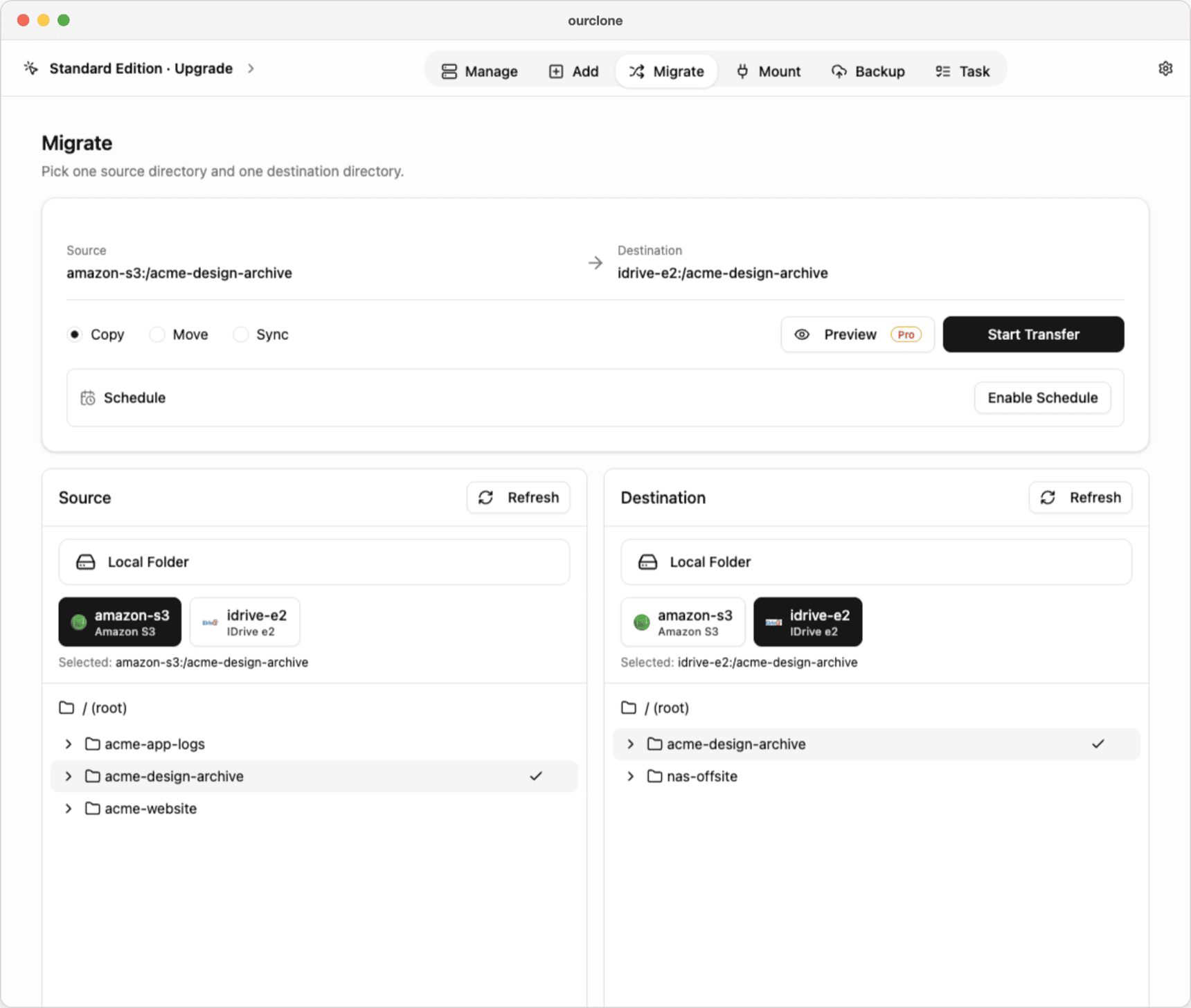
idrive-e2), the e2 Access Key ID and Secret Access Key, and paste your region's endpoint from the e2 dashboard into Endpoint. OurClone shows that field as optional, but don't skip it: left empty, the connection goes to Amazon's servers instead of IDrive's and the bucket list won't load. Click Confirm. - 🔀 Step 3: Pick the Buckets and a Mode — Open the Migrate tab. Under Source, select
amazon-s3and the bucket or folder to move (hereacme-design-archive); under Destination, selectidrive-e2and the bucket you created. Then choose:- Copy — puts the objects in e2 and deletes nothing from S3.
- Move — copies the objects, then deletes them from the S3 bucket.
- Sync — makes the e2 bucket match S3; objects that exist only in e2 are deleted, S3 is never changed.
- ✅ Watch It Finish in the Task Tab — Task → Transfers shows the file count and speed while it runs, then Completed. Objects that failed are listed on the task, and Run again retries them while skipping what's already in e2.
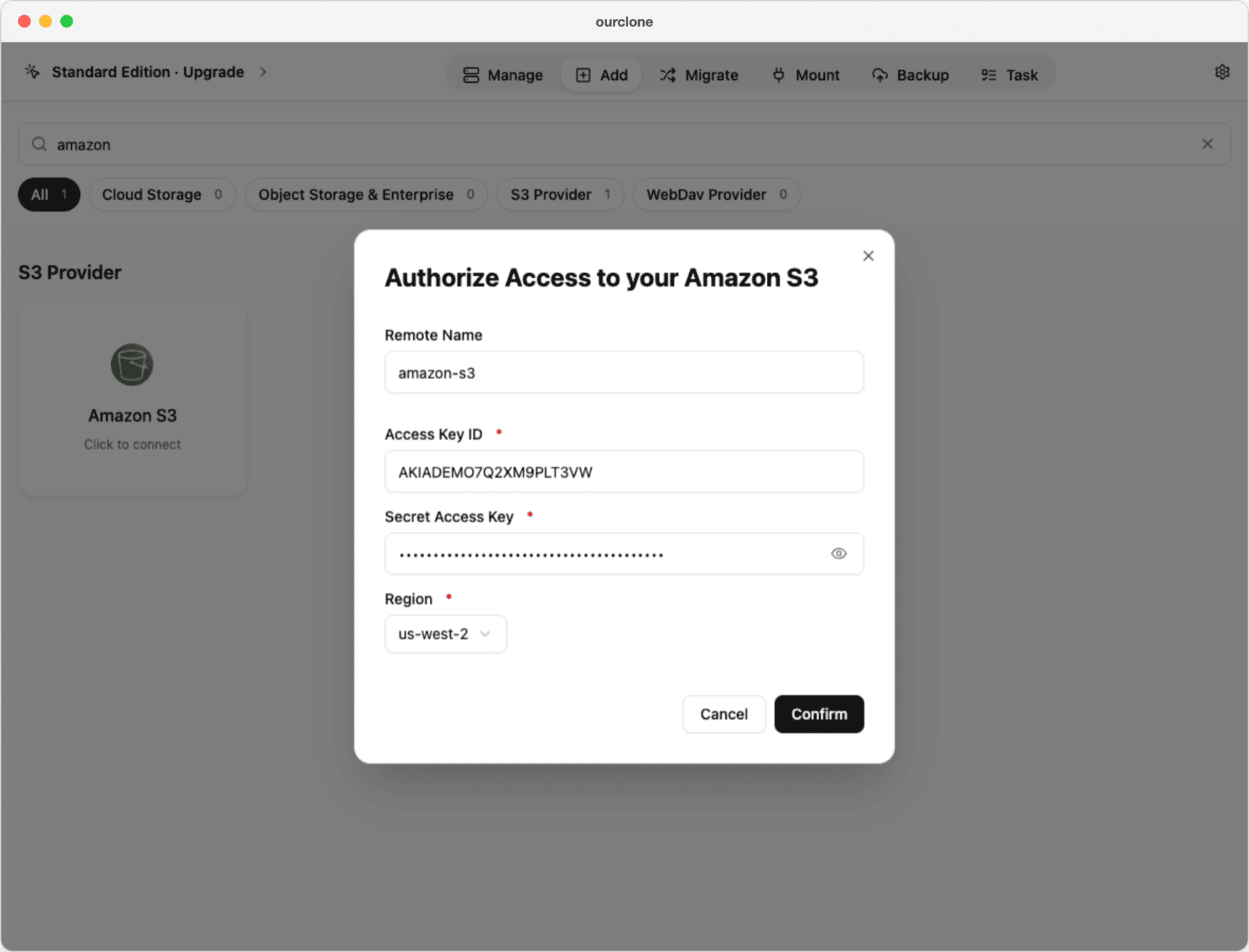
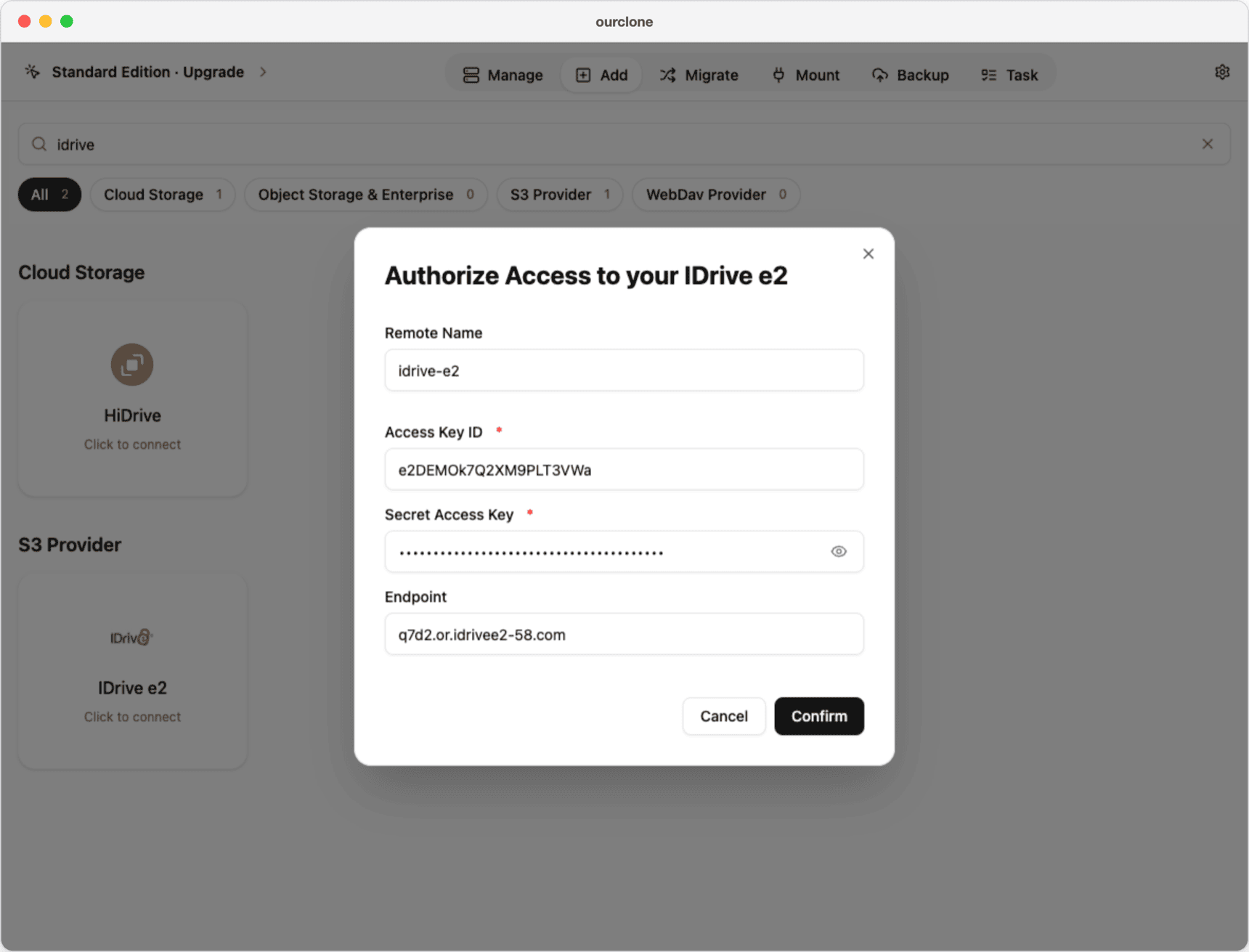
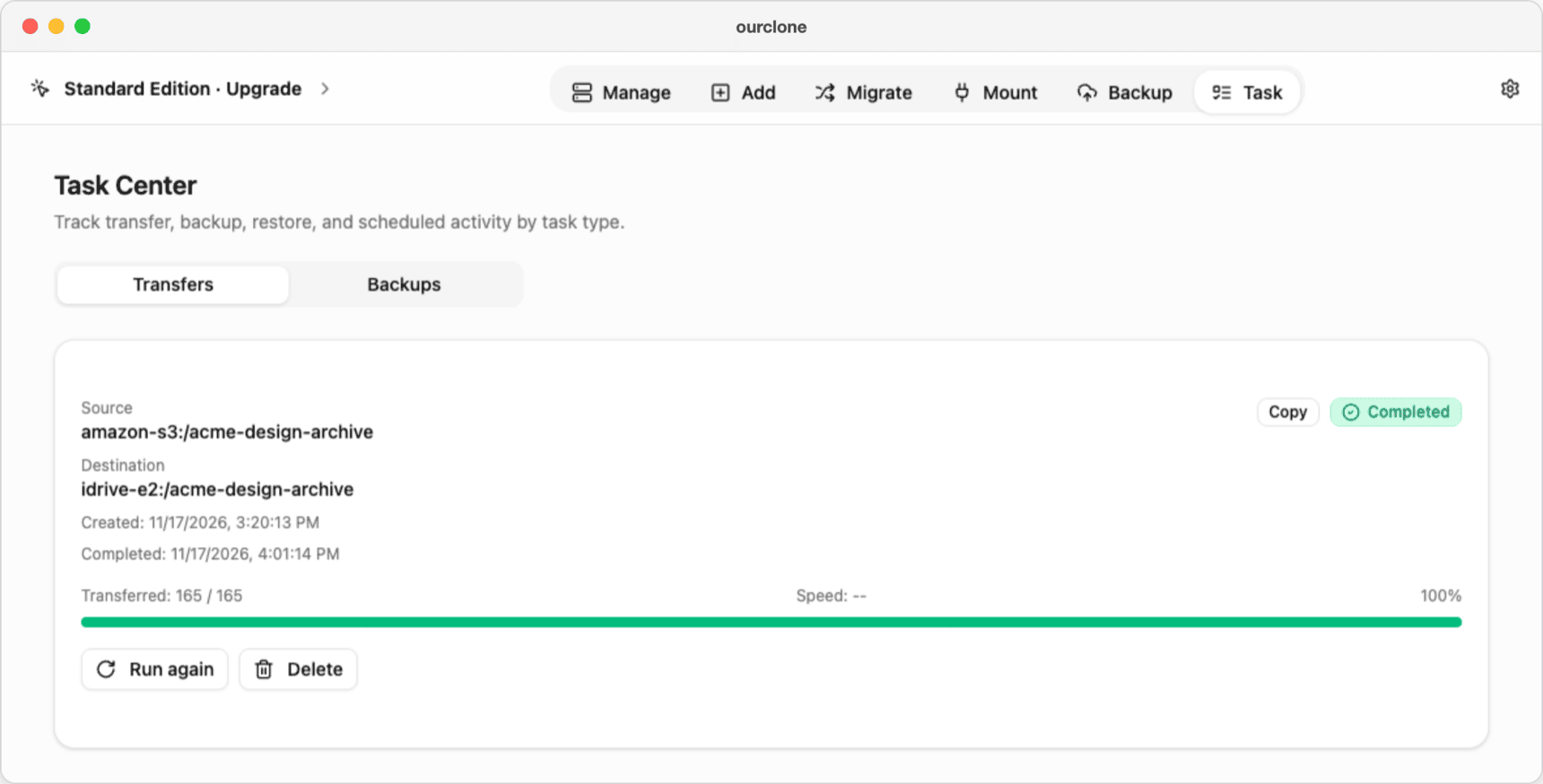
OurClone doesn't check keys when you click Confirm; the first real test is opening the buckets on the Migrate page. An error there almost always means a wrong key, a key from a different e2 region, or a missing or wrong endpoint — delete the connection and add it again.
Method 3: Copy S3 to IDrive e2 with rclone
OurClone runs rclone underneath, so the same copy works from the Terminal. That's handy on an EC2 instance next to the bucket, or when you want the job in a script.
1. Install rclone
Download it from rclone.org, or run brew install rclone on a Mac.
2. Create the two remotes
Run rclone config and add two remotes of type s3: one with provider AWS, your keys and region us-west-2, and one with provider IDrive, the e2 keys and your region endpoint. Both are covered in the rclone S3 docs.
3. Run it
# Copy: S3 keeps every object
rclone copy s3:acme-design-archive e2:acme-design-archive --progress

# Move: delete from S3 once each object is in e2
rclone move s3:acme-design-archive e2:acme-design-archive --progress

# Sync: make the e2 bucket match S3 (deletes extras in e2)
rclone sync s3:acme-design-archive e2:acme-design-archive --progress- ⚠️ Try
moveandsyncwith--dry-runfirst. - ⚠️ If the e2 key can only reach one bucket, add
--s3-no-check-bucketso rclone doesn't try to create it. - ⚠️ Keys for both clouds sit in your rclone config, and progress and errors only show up in the Terminal.
What Usually Goes Wrong (and Questions People Ask)
- 💸 The AWS egress bill — Copying out of S3 over the internet is billed per gigabyte after the monthly free 100 GB, plus GET requests. Budget for it before a large move. AWS has also announced free data transfer out for customers leaving AWS entirely, requested through AWS Support — check whether that applies to you.
- 🗺️ Wrong or empty e2 endpoint — The most common failure. Copy the endpoint for the bucket's region from the e2 dashboard, and use a key created for that same region.
- 🔒 Access denied on the S3 side — The IAM user needs at least list and read on the bucket; Move also needs delete. Bucket policies that restrict by IP or VPC can block your Mac too.
- 🧊 Objects in Glacier classes — Objects in Glacier Flexible Retrieval or Deep Archive have to be restored in S3 before anything can read them. Restore them first, or the transfer will report them as failed.
- 📊 Counts don't match — Check the failed list on the task. Empty "folder" placeholder objects in S3 don't always reappear on the other side, which is expected.
Does Copy or Sync touch my S3 bucket?
No. Only Move deletes from S3. Copy writes to e2 only, and Sync only deletes objects in e2 that aren't in S3.
Does the data go straight from AWS to IDrive?
No. With OurClone or rclone on your Mac, each object is downloaded from S3 and uploaded to e2 over your connection. Nothing is kept on your disk, but your bandwidth sets the pace — rclone on a cloud server avoids that if the bucket is large.
Can I keep new objects flowing to e2 for a while?
With Pro, save the transfer as a schedule that runs one time, weekly or monthly at a time you choose. Your Mac has to be on when it runs; it isn't continuous replication.
What can I do with the e2 bucket afterwards?
Point your backup at it — see backing up a Mac to IDrive e2 — or mount IDrive e2 on macOS to browse it like a folder. Moving to Cloudflare R2 instead? The steps are almost the same in Amazon S3 to Cloudflare R2.